One-Click Apply.
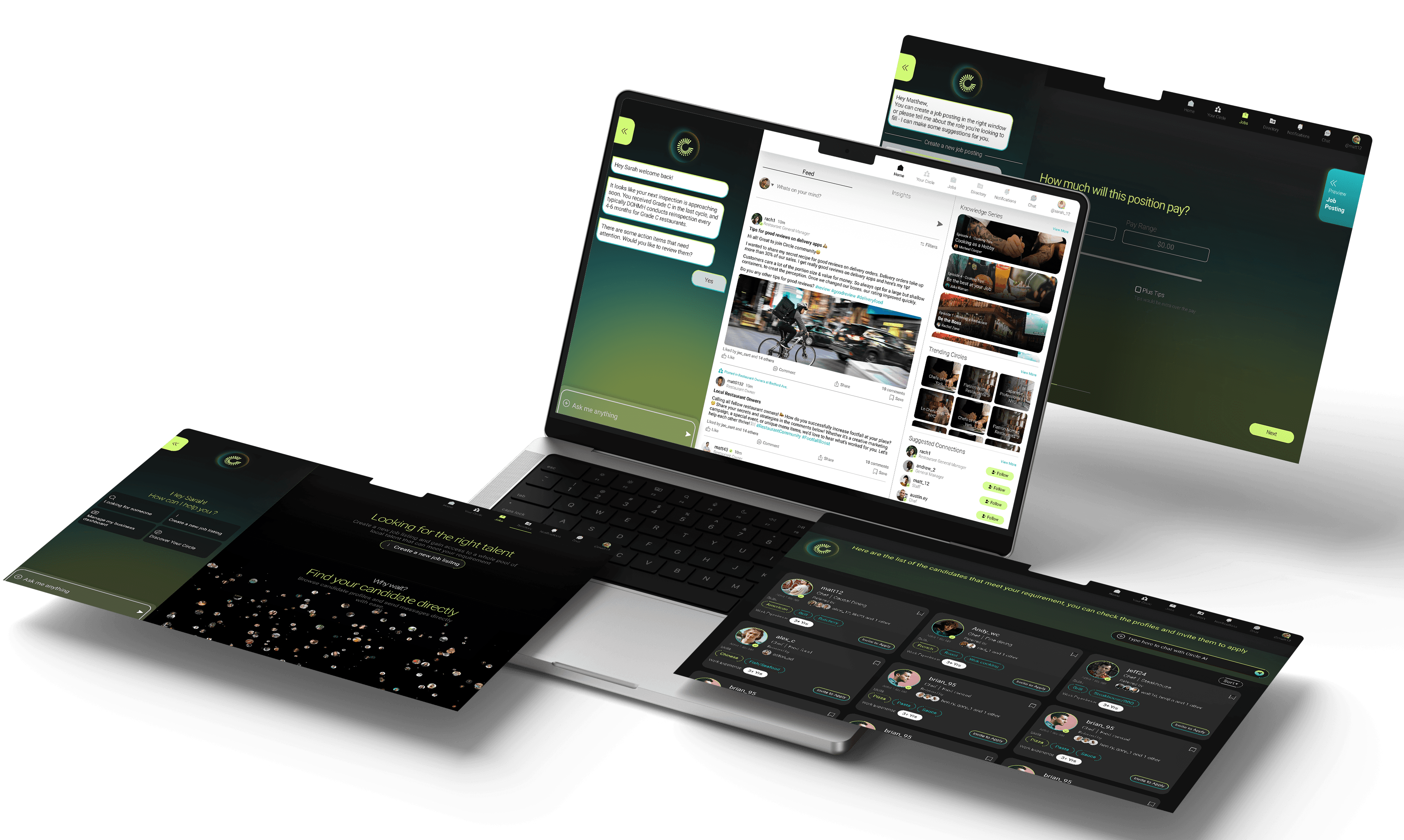
An AI-assisted mobile app that lets frontline workers apply to dozens of jobs in seconds — without filling the same form over and over again.
23m→ 10s
Application time per job, before and after
20–25
50+
Job offers generated in the first month post-launch
~100/day
Applications processed across the platform daily
Frontline restaurant hiring
is structurally broken.
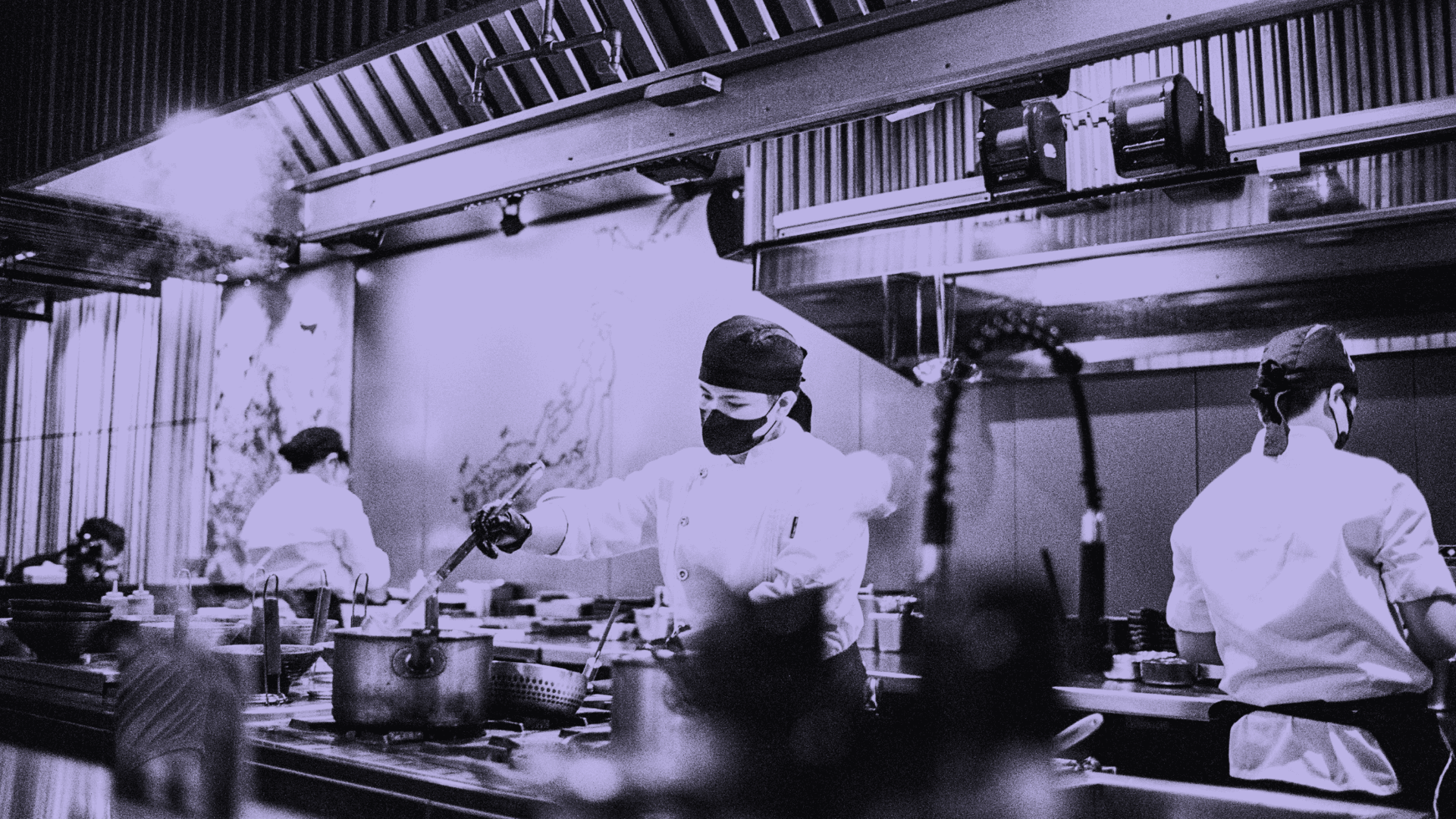
This isn't a problem of not enough jobs. There are millions of open roles. The problem is that the process of getting hired is so painful that workers give up — and restaurants stay empty as a result.
Imagine you're a line cook in New York. You need a new job — fast. You open Indeed, find a listing, tap Apply, and get redirected to a corporate ATS system. You create an account. Upload your resume. Re-type your work history. Answer 12 screening questions. Hit submit. Then you wait. And wait. You never hear back. So you try again at the next restaurant — and repeat the exact same process from scratch.
That's the reality for millions of frontline workers. And it's why 60% of applicants abandon before finishing. The platform isn't broken because it's ugly. It's broken because it was designed for corporate hiring — long, deliberate, resume-first — and applied unchanged to an industry that works nothing like that.
Applications are long and repetitive
The average application takes ~23 minutes. The same name, availability, certifications, and work history entered fresh for every single job. — HiringThing [→]
Workers abandon before finishing
60% drop off before completing an application. Not because they don't want the job — because the form is exhausting. — SHRM, Onerec[→]
Industry is critically understaffed
4 in 5 restaurants are understaffed right now. 75%+ annual turnover means workers are constantly applying. — National Restaurant Association, BLS[→]
Candidates never get feedback
75% of applicants never hear back after submitting. This creates a black hole that destroys motivation to keep trying. — PRNewswire[→]
Job discovery is fragmented
Workers switch between Indeed, Craigslist, Job Today, Poached, Snagajob, Culinary Agents — each with its own login, form, and process. No continuity.
TRADITIONAL HIRING ASSUMES
→ Long, structured forms with many fields
→ Profile creation before any application
→ Role-by-role applications — deliberate, slow
→ Delayed responses are acceptable
→ Workers have time to wait and follow up
→ Fast, mobile-first flows — apply in under 2 minutes
→ Apply first, verify details later
→ High-volume — workers apply to 10+ roles at once
→ Instant or same-day responses
→ Walk-in mentality — urgency is the default
Three real people.
One broken system.
We ran 18 semi-structured interviews with frontline job seekers — 67% first-time platform users, 72% mobile-only. These aren't edge cases. They're the majority of the market.
Alex — Server
24 · Austin, TX · iPhone · Craigslist + FB Groups
Needs to apply to as many jobs as possible this week. Has 15-minute windows during the day — lunch, transit.
Re-entering the same data on every form. Doesn't know if applications are even received.
Applies to 20+ roles in one session. Status tracking shows exactly what happened to each application.
Maria — Line Cook
28 · Queens, NY · Android · Limited English · Immigrant
Needs a job within 48–72 hours. Deeply worried about what data she's giving away and to whom.
Compliance questions (SSN, work authorization) appearing without explanation trigger fear and immediate drop-off.
Sensitive fields are gated and explained clearly. "What this is for" labels at every step. Automation stops for legal questions.
James — Restaurant Manager
38 · San Francisco · Harri · Workday · Greenhouse
Needs to staff a restaurant — fast — while staying legally compliant. Uses 3 different ATS systems simultaneously.
Receiving hundreds of incomplete applications. Can't verify what the AI submitted. No audit trail.
Every AI action is logged. ATS field mapping verified. Human approval gates before legal steps. Full audit trail.
18
Semi-structured interviews with frontline job seekers
45–60
3
Dominant behavioural themes identified
72%
Mobile-only users · no desktop access
Repetition Fatigue
OBSERVATION
Re-entering identical data on every application — name, availability, certifications, work history — across every single job, every single time.
BEHAVIOUR PATTERN
Users developed "form fatigue shortcuts" — skipping optional fields, copying previous answers verbatim even when outdated, abandoning halfway through rather than continuing.
DROP-OFF SIGNAL
Avg. session lasted under 12 minutes before abandonment. Most left at the same field — available work schedule — answered identically on every previous application.
DESIGN IMPLICATION
Build a profile memory layer. Capture once. Reuse silently. Never ask for the same information twice.
Automation Anxiety
OBSERVATION
Users wanted help reducing effort — but any AI action taken without their knowledge immediately triggered distrust, even when the action was correct.
BEHAVIOUR PATTERN
Participants consistently opened and re-read every prefilled field before submitting — not to change them, but to verify ownership. The check was a trust ritual, not an editing task.
CRITICAL FINDING
Full automation experiment confirmed this: when AI submitted without visible confirmation, 74% of users reported feeling "out of control" and 38% manually withdrew applications.
DESIGN IMPLICATION
Every AI action must be visible, labeled, and reversible. "Filled from your profile" attribution isn't optional — it's the source of trust.
Time Pressure
OBSERVATION
Workers apply during narrow windows — lunch breaks (12–15 min), transit (20 min), between shifts. The ~23-minute application doesn't fit in any of them.
BEHAVIOUR PATTERN
Users who abandoned mid-session rarely returned to finish. The moment of interruption created a psychological reset — the application felt "lost" even when still open on their phone.
INTENT SIGNAL
Participants had clear session goals — "apply to as many relevant jobs as possible right now" — but the linear, form-heavy flow treated each job as an isolated event. Intent was ignored by the system.
DESIGN IMPLICATION
Reduce repeat application time to under 90 seconds. Design for the motivation spike — the whole flow must be completable in one break.
16 platforms audited.
Same structural failure everywhere.
Before designing anything, we audited 16 ATS platforms that collectively power hiring for McDonald's, Chipotle, Starbucks, Subway, and most major franchise chains. The finding was consistent: even the "AI-first" platforms force candidates through compliance-driven corporate workflows built for desk jobs, not frontline workers.
Workday
Multi-step long form
Thorough data capture
Not mobile-friendly. Context lost in ATS redirects.
iCIMS / SmartRecruiters
Resume + cover letter focus
Strong for office roles
Excludes non-résumé or blue-collar candidates entirely.
Snagajob
Local job listing
Nearby roles surfaced
Still requires discrete full forms per job. No reuse.
Job Today
Short matching input
Fast initial match
No tracking or apply history. Profile resets between jobs.
Paradox (Olivia)
AI conversational flow
Reduces form friction
Still compliance-driven. Conversation resets each time.
Facebook Groups
Informal posting
Zero friction to post
No structure, no tracking, no verification — at all.
We tried full automation first.
It broke.
Before building the AI-assisted model, we ran a real experiment. The hypothesis seemed logical: if we automate the entire application process, workers can apply at scale and employers get more candidates. We built it. We launched it. The results were worse than manual applications.
The hypothesis that seemed right
If a frontline worker needs to apply to 20 jobs and the biggest barrier is filling out the same form 20 times — why not let AI fill them all? We would use a workmail.ai proxy email identity to submit applications, communicate with hiring systems, and receive employer responses automatically. The user sets preferences once. AI handles everything else. Volume goes up. Friction goes to zero.
What actually happened
Application volume went up 40×. Employer response rate dropped 61%. We lost users faster than we gained them. Four employer accounts flagged quality concerns within the first two weeks. Here's the full picture:
PHASE 1 — MANUAL BASELINE
App time
~23 min
Apps / session
1–2
Drop-off rate
~60%
Employer response
Baseline
User trust
3.1 / 5
Answer accuracy
High
Job offers / month 1
Baseline
PHASE 2 — FULL AUTOMATION ✗
App time
~10 sec
Apps / session
20–50 unreviewed
Drop-off rate
9%
Employer response
–61% vs baseline
User trust
2.2 / 5
Answer accuracy
Low — generic AI
Job offers / month 1
Near zero
PHASE 3 — AI-ASSISTED ✓
App time
~10 sec (repeat)
Apps / session
20–25 confirmed
Drop-off rate
7%
Employer response
1.8× baseline
User trust
4.3 / 5
Answer accuracy
High
Job offers / month 1
50+
The four ways full automation failed
Answer–context mismatch
WHAT HAPPENED - AI generated generic responses to ATS screening questions. The answers were technically correct but didn't reflect the candidate's actual experience, tone, or situation. They read as machine-generated — because they were.
EVIDENCE- Employer response rate fell 61%. Recruiters in 3 post-experiment interviews said they could tell immediately that answers were AI-generated.
Impact - Applications ignored
Invisibility destroyed trust
WHAT HAPPENED - Users had zero visibility into what was submitted on their behalf. They couldn't see what answers the AI gave, verify accuracy, or feel any ownership over their own job search. Even when the AI was correct, the invisibility felt threatening.
EVIDENCE- 74% reported feeling "out of control" in post-experiment surveys. 38% manually withdrew applications during the experiment.
Impact - User disengagement
No signal of genuine intent
WHAT HAPPENED - Sending 50 identical-pattern applications from the same proxy email address in one day looked like spam to employer ATS filters. Many were blocked or deprioritized before any human ever saw them.
EVIDENCE- Open rate: 23% for automated applications vs. 67% for manually-completed ones — same week, same platform, same roles.
Impact - Volume without results
Errors compounded silently
WHAT HAPPENED - Wrong availability windows, incorrect certification flags, mismatched role experience — all submitted at scale with no user checkpoint. One wrong answer across 50 applications is 50 wrong answers.
EVIDENCE- 4 employer accounts flagged data quality concerns in the first 2 weeks. Errors that would have been caught in a manual review were invisible.
Impact - Platform reputation
Participant 3 · Exit interview, full automation phase
Participant 7 · Exit interview, full automation phase
Participant 11 · Exit interview, full automation phase
Participant 9 · Exit interview, full automation phase
Full automation solved the wrong problem. The bottleneck wasn't speed — it was trust and accuracy. Users didn't need AI to replace them. They needed AI to understand them well enough to act on their behalf accurately, while staying visible and reversible at every step. This failure directly defined the AI-assisted interaction model that followed.
The pivot wasn't "less automation." It was smarter automation. AI handles the repetitive 80% — data re-entry, answer formatting, ATS adaptation. The user remains the final authority on what gets submitted. Speed without visibility is not a product. It's a liability.
Five principles.
One coherent interaction model.
The full automation experiment gave us the design brief: AI must act on the user's behalf while staying completely visible and reversible at every step. We defined five behaviors that govern how AI operates in the system — and each one is deliberately expressed in the UI so users always know what's happening and why.
01 · LEARN ONCE
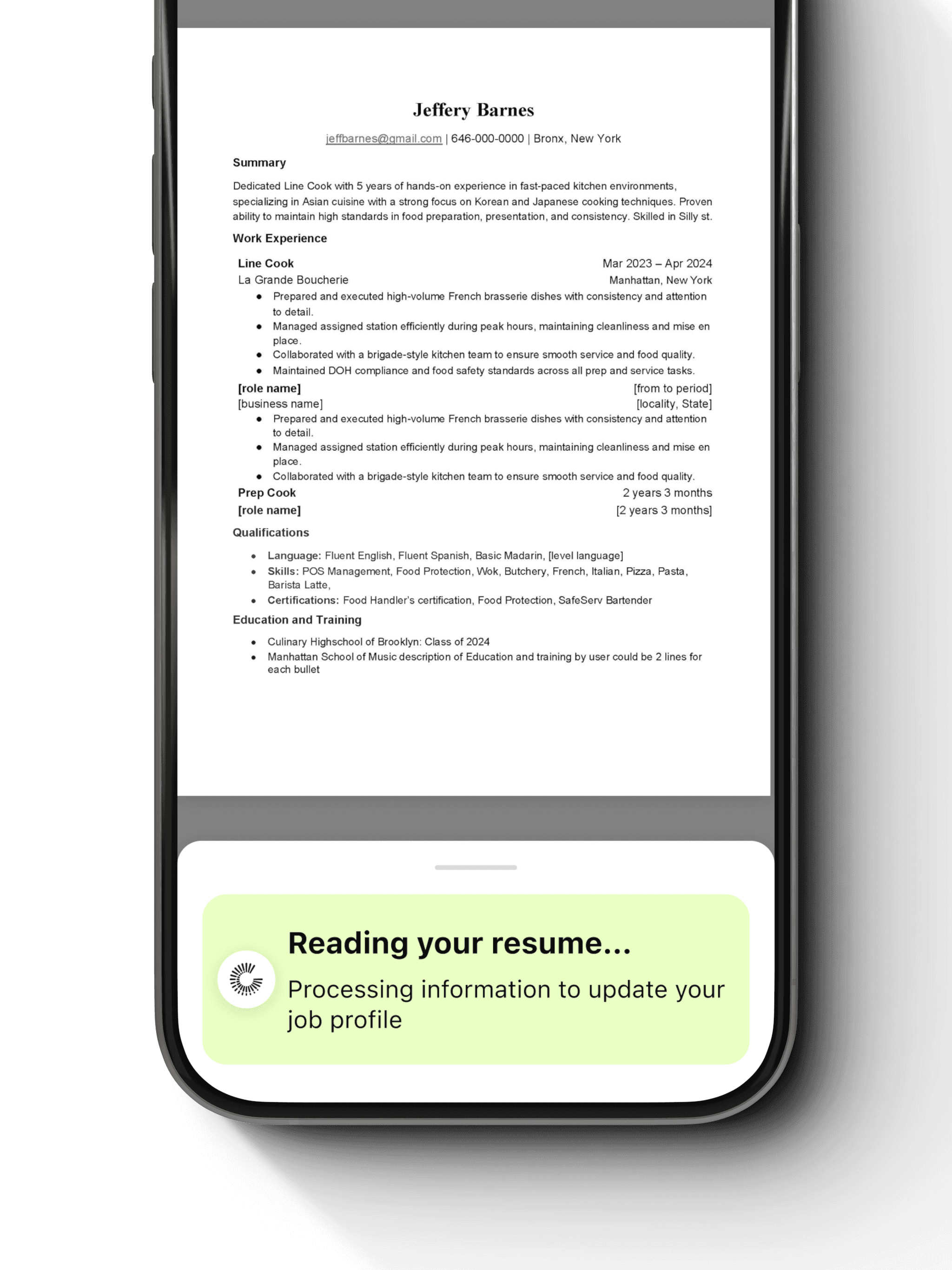
Capture user information a single time
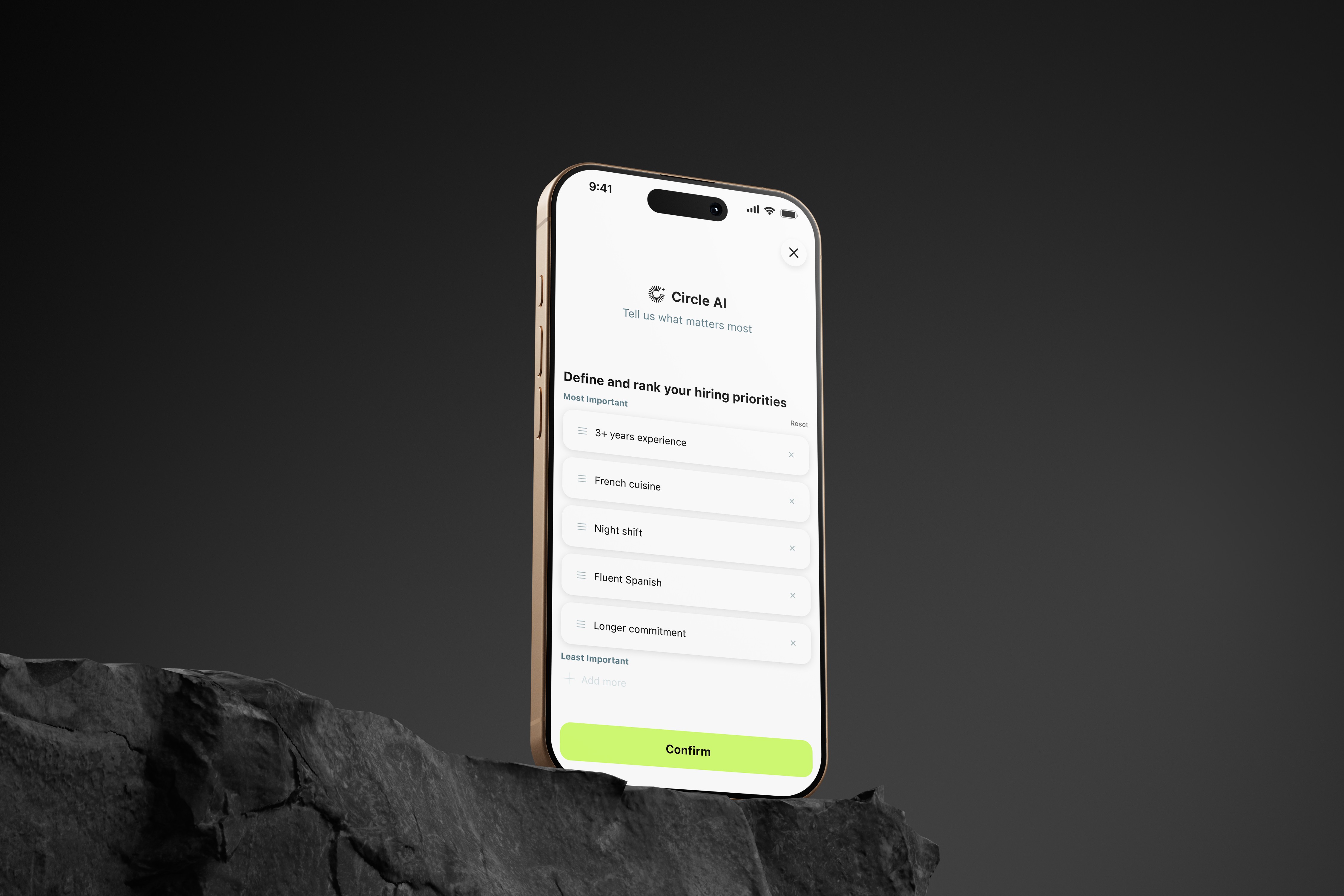
The system reads the user's resume and asks a short set of baseline questions. This happens once — at the start — and never again. The AI extracts availability, certifications, work history, and preferences into a profile it can reuse.
Profile setup is lightweight and progressive. Parsed resume data is previewed and fully editable — users see exactly what the AI captured before it's ever used.
02 · REUSE CONTEXT
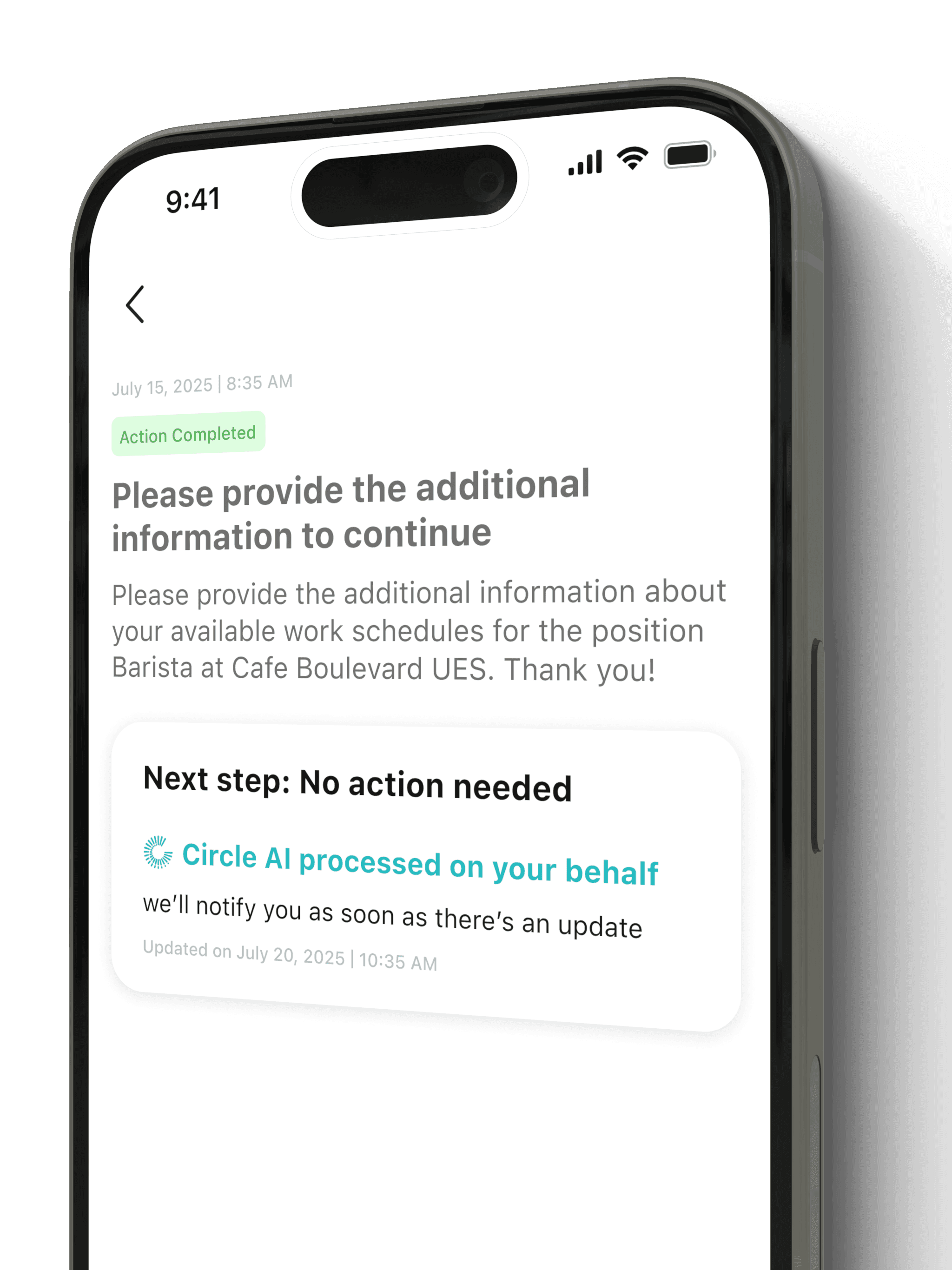
Never ask for the same information twice
When a user applies to their second, fifth, or fiftieth job, every piece of information that was already provided is automatically carried forward. The user never sees fields they've already filled. The AI handles the repetition entirely.
Long application forms are replaced with a short confirmation view: "Here's what will be submitted. Review and approve." That's it.
03 · ASK ONLY WHEN UNKNOWN
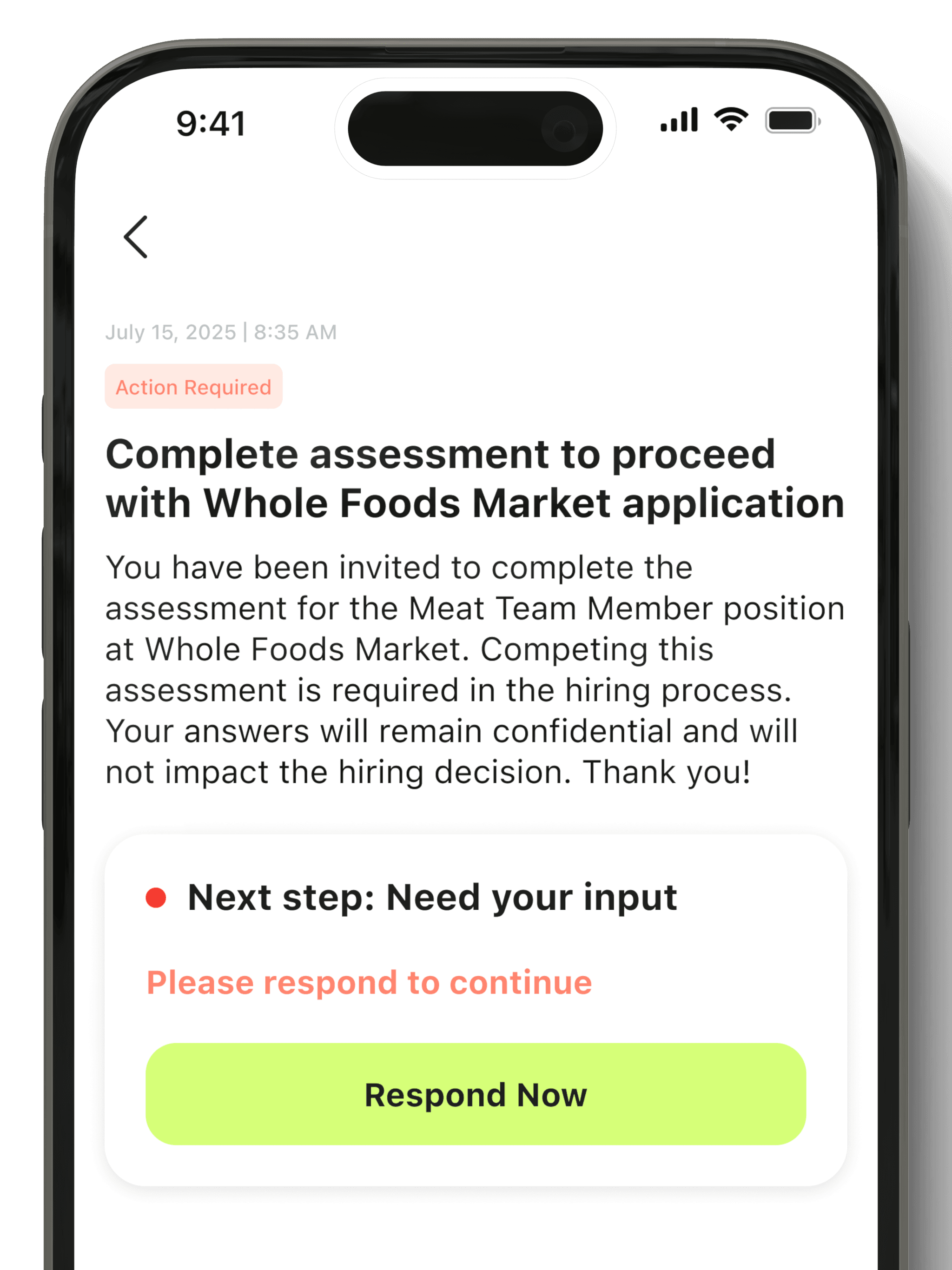
Surface new questions precisely when needed
If a specific employer requires information the AI hasn't captured before — a particular certification, a shift preference, a background check consent — the system asks exactly that one question. It stores the answer for all future applications that need it.
New questions appear inline, in context, labeled "Saving this for future applications" — so users understand the ask is a one-time thing, not a regression.
04 · PROVIDE CLEAR FEEDBACK
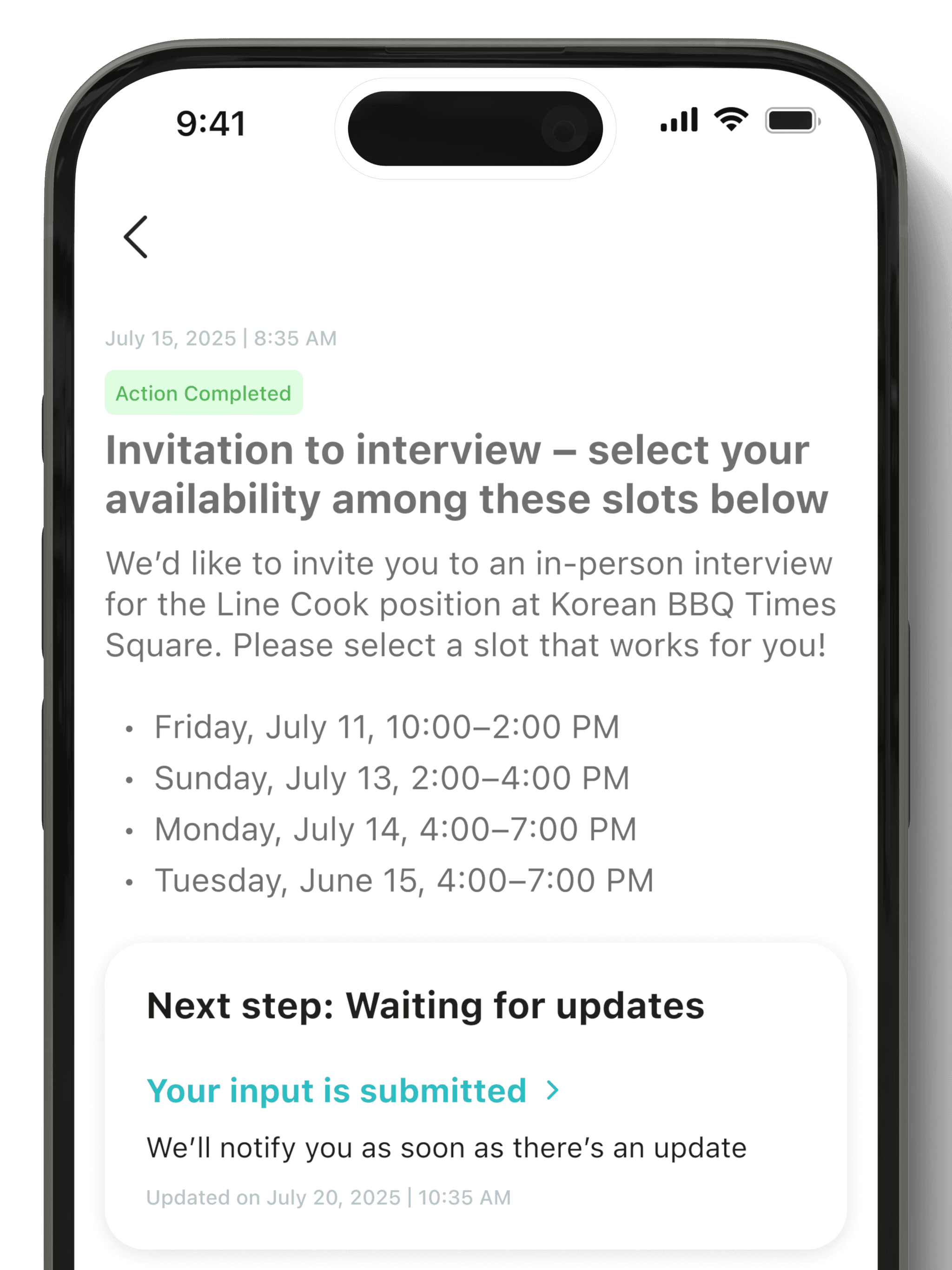
No silent or ambiguous state transitions
After every submission, the system shows exactly what was sent, to whom, what the next step is, and what action — if any — is needed from the user. The black hole that killed motivation in manual applications is eliminated entirely.
A persistent status screen shows every application with its current state: Submitted, Employer Viewed, Interview Invited, Action Required, Offer Received.
05 · RESPECT HUMAN BOUNDARIES
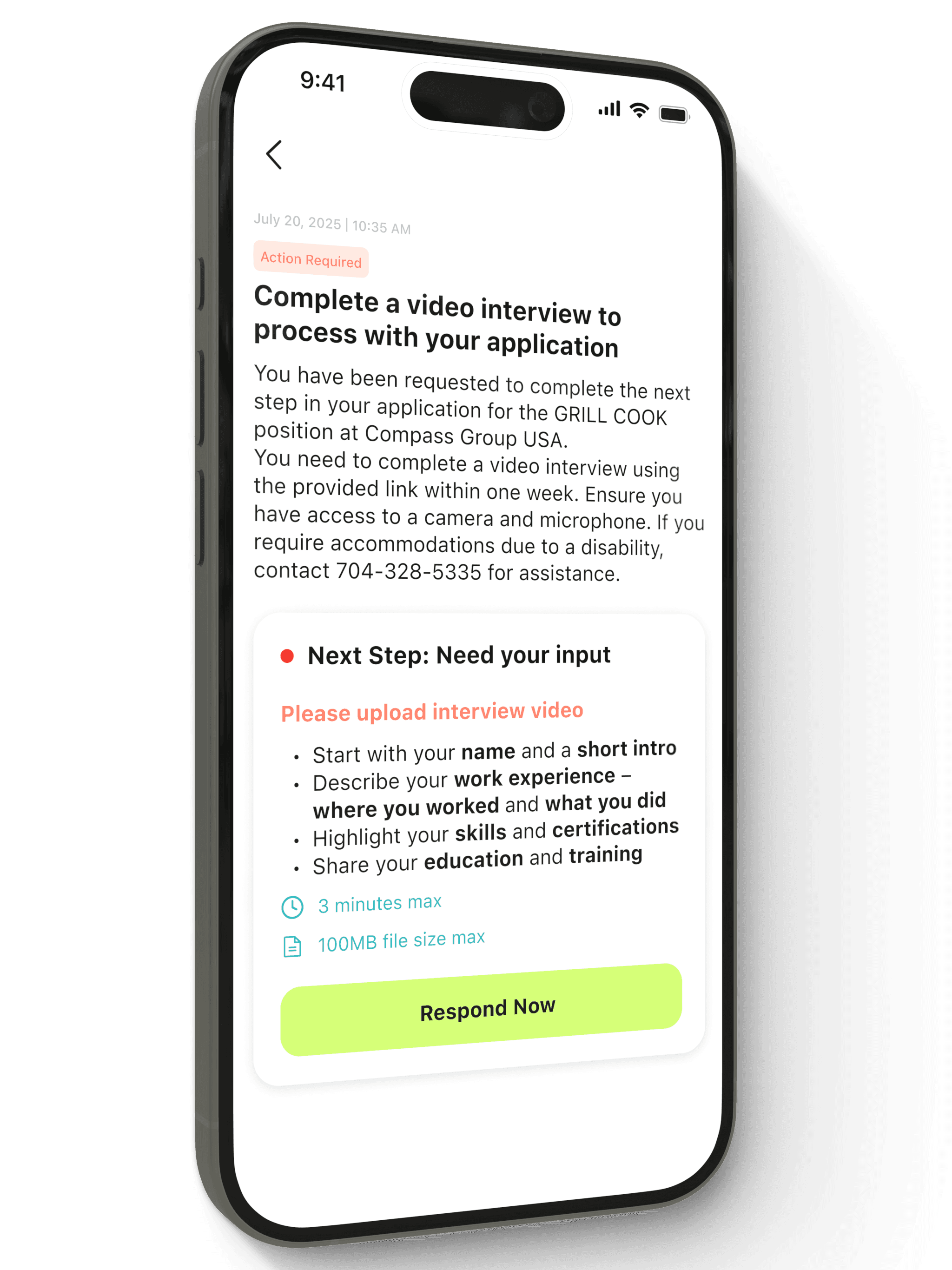
Automation stops where humans must decide
WOTC compliance forms, offer letters, employment agreements, and assessments require genuine human consent and awareness. The AI never handles these — not because it can't technically, but because doing so would create legal risk and destroy user trust.
The interface clearly marks these transitions: "This step needs your input." The visual language shifts — different color, explicit prompt — so the mental model stays consistent.
Core Principle
The job card took
three versions to get right.
The job discovery screen was the hardest to design. It needed to feel fast enough for a worker on a 15-minute break but trustworthy enough for someone applying to 20+ roles at once. Here's how it evolved.
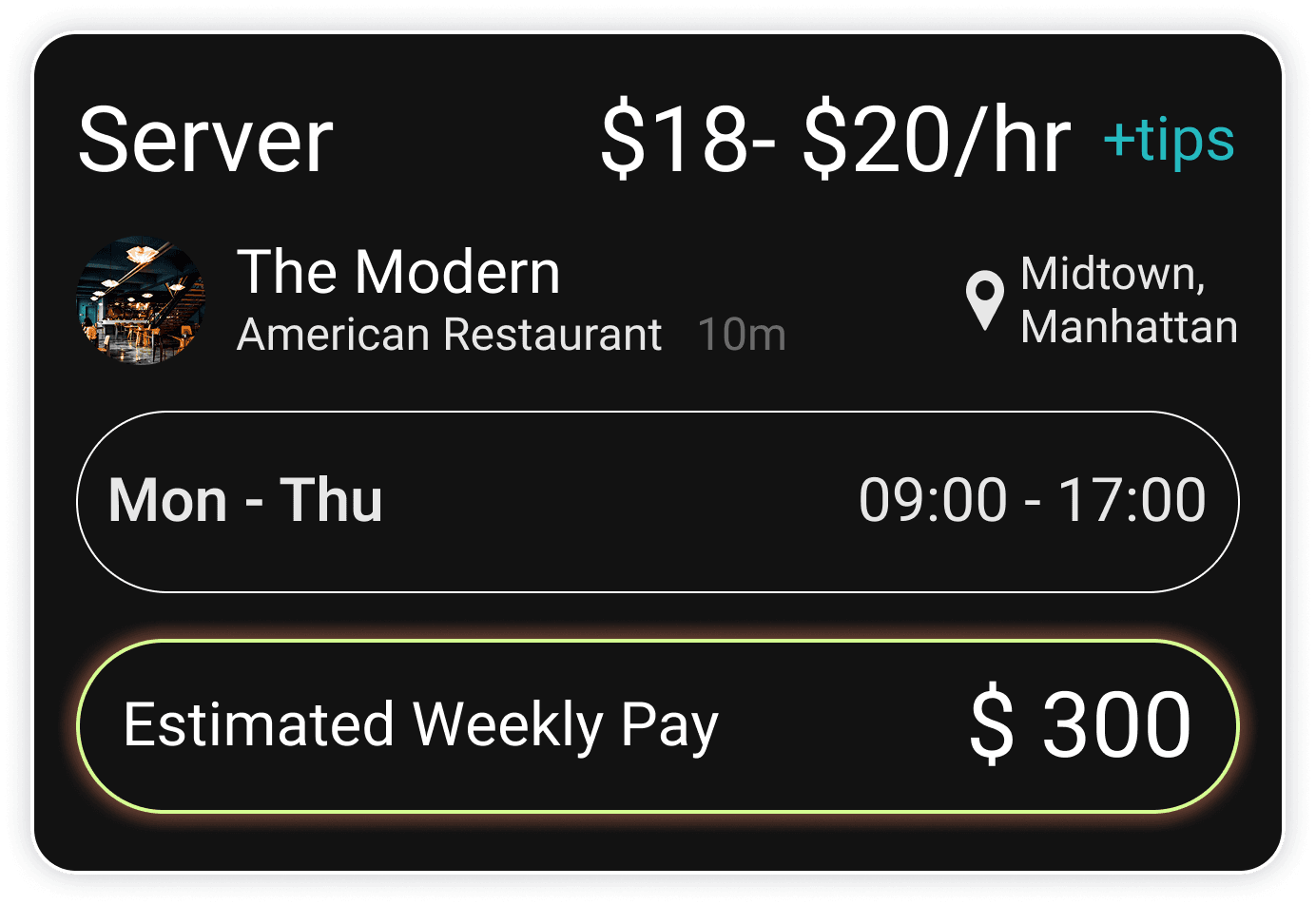
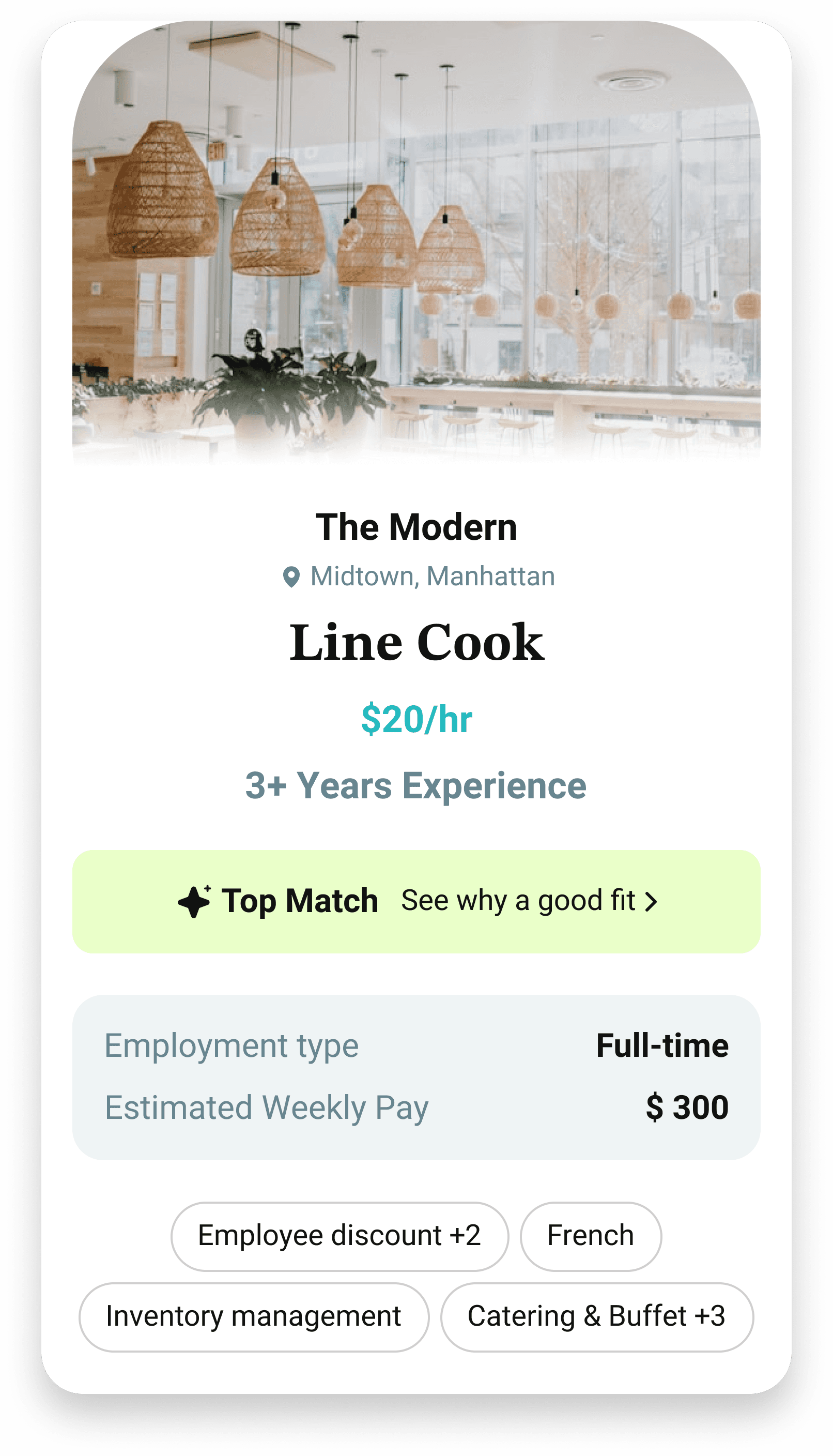
VERSION 1
Job Board Mode
Jobs as a separate feature inside the app
Dark theme, traditional list layout
Felt like any other job board
Dense, hard to scan on mobile
Emotionally uninviting for daily use
Discarded — Transactional, disconnected from the AI-first promise
VERSION 2
AI-Guided Feed
Jobs on the home screen, light UI
Personalized with "Why this is a good fit"
AI explanations required opening each card
Users wanted to act immediately, not read
Opening every card before applying felt like extra steps
Discarded — Intelligence was right, access to it was too slow
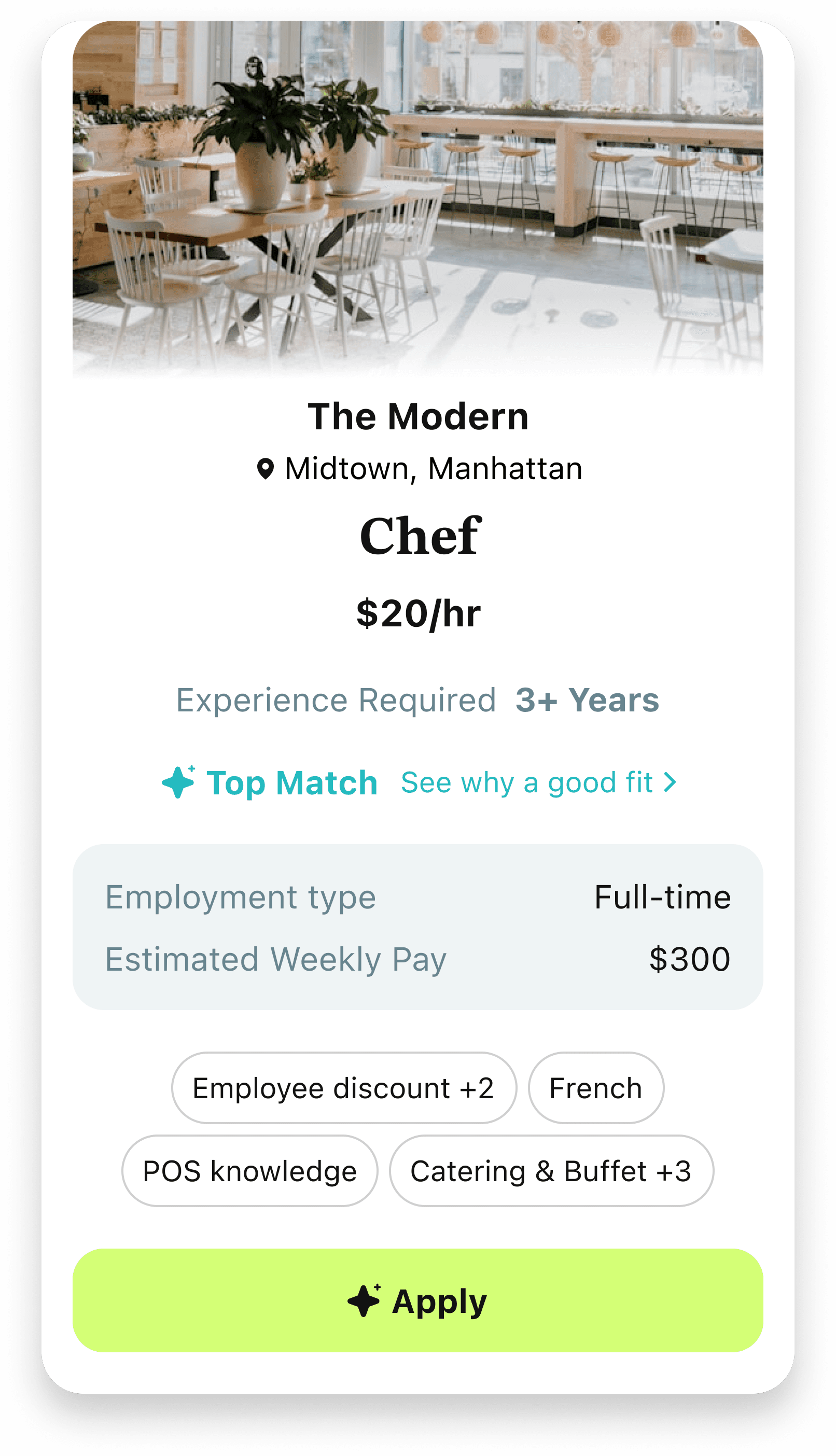
FINAL VERSION — SHIPPED
Intent-First Cards
Suggested roles based on profile intent
Top Match badge + "See why" — accessible but not mandatory
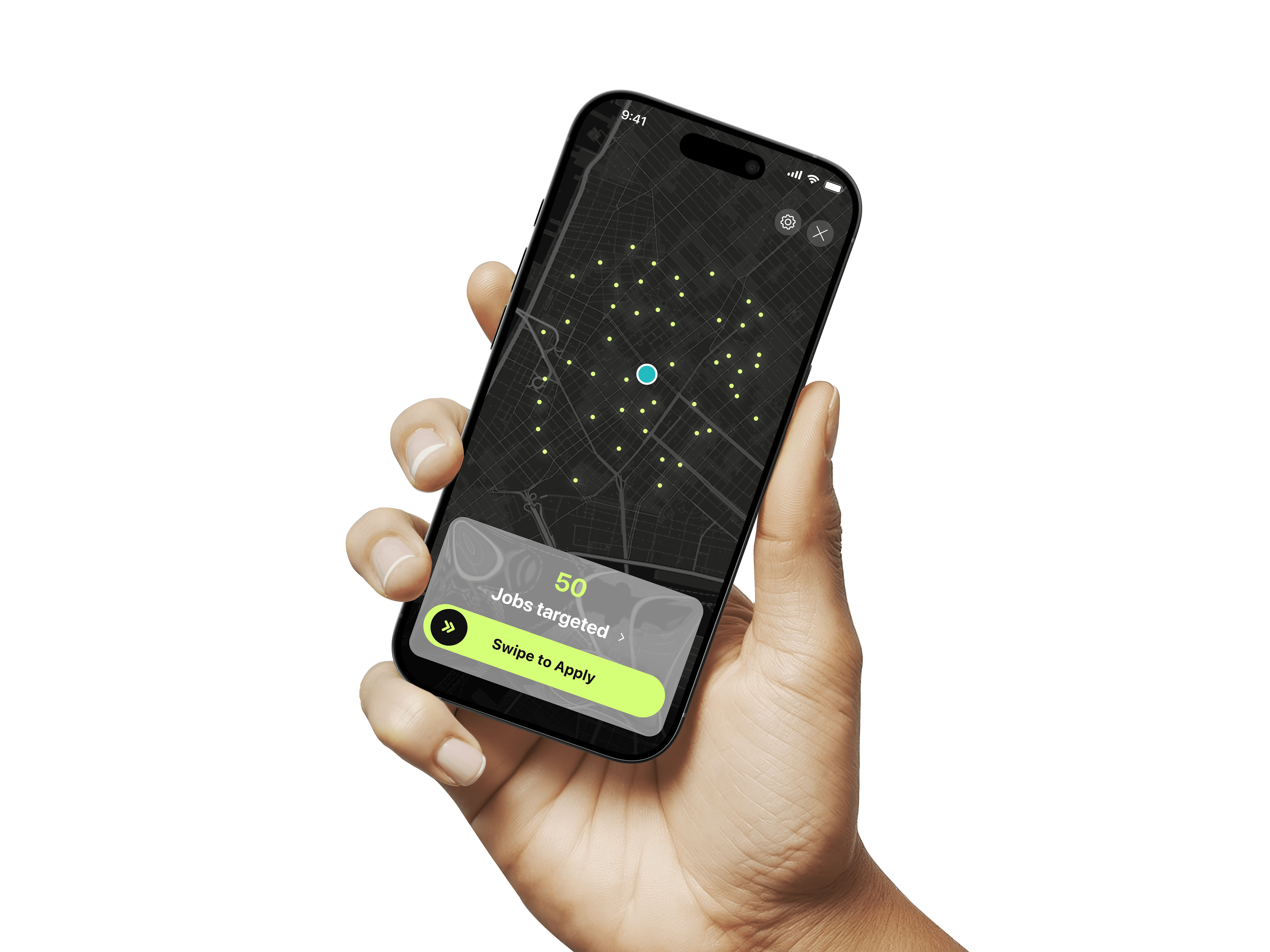
Swipe right to apply. Swipe left to skip.
All secondary details inside filters/search
One card. One decision. One swipe
Shipped — Fast, focused, zero cognitive overload

Two rounds of testing.
Every metric improved.
Round 1 tested a lo-fi prototype with 8 participants. Round 2 tested the high-fidelity design after iteration with 10 participants. All sessions were mobile, recorded, and scored against pre-defined task criteria. The funnel data below comes from the first 60 days of live usage.
Usability task performance — Round 1 → Round 2
The most important finding from Round 1: users didn't understand that their profile data was being saved for future applications. Once we made that visible — a confirmation screen after profile setup showing "Your profile is saved. Future applications will use this automatically" — the second-application success rate jumped from 61% to 96%.
WHAT CHANGED BETWEEN ROUNDS
Complete first application from scratch
78% → 94%
4m 20s → 2m 10s
Progressive disclosure replaced the single-page profile dump. Step-by-step felt natural on mobile.
Apply to a second job after profile is set
61% → 96%
9m 40s → 10s
Most critical fix: added a confirmation screen that shows the user their data is saved. Until then, most didn't realise they were in a 10-second flow.
Identify and edit a prefilled field
55% → 89%
2m 30s → 45s
Inline edit icons replaced a hidden affordance. The edit tap target was too small and invisible in R1.
Find application status after submitting
44% → 91%
3m 10s → 50s
R1 had no dedicated success screen. R2 added an explicit confirmation with a direct "Track this" link.
Trust AI fill without verifying every field
38% → 72%
N/A
"Filled from your profile" labels built trust. Users needed to see the attribution — not just the filled value.
Participant 4 · Round 2 session
Participant 7 · Round 2 session
Participant 12 · Round 2 session
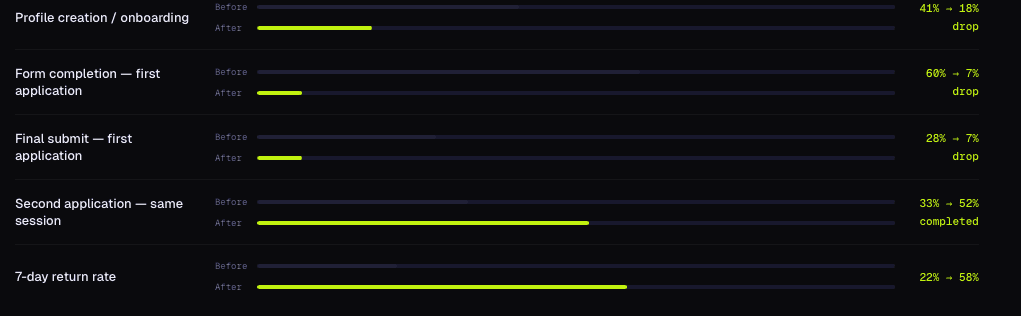
Drop-off funnel — baseline vs. post-launch (60 days)
The funnel improvement is most dramatic at the second-application step. Before, 67% of users who completed their first application never attempted a second. After the redesign — with the profile confirmation and 10-second repeat flow — 52% completed a second application in the same session.
3,400 sessions.
What users actually did.
Post-launch data from Mixpanel event tracking and FullStory session recordings over 60 days. This data informed two product patches (1.1 and 1.2) that shipped within the first month.
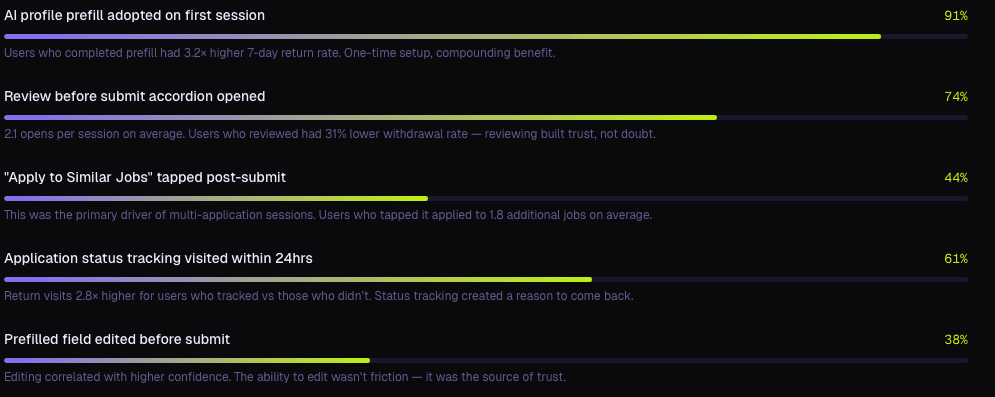
What 38% of users did on their first profile setup
They edited at least one prefilled field before submitting. This is a positive signal — it means the AI's parse was visible and reviewable, not invisible. Users who edited a field had significantly higher confidence scores and lower withdrawal rates than those who didn't. We actively kept the edit affordance prominent rather than hiding it.
What the heatmap data told us
Two fixes came directly from heatmap data. The submit button on the repeat application screen was below the fold on smaller iPhone models — discovered when rage-click data spiked on the empty space below the form. Moved above fold in patch 1.1. Separately, the 'Skip' option on the social links section of profile setup was rage-clicked by 22% of users before it had even rendered — the section loaded 200ms late, creating a frustrating dead period.
HOTTEST ZONE
Resume upload button — 94% scroll depth, high dwell
COLDEST ZONE
Optional social links section (bottom 20%)
FIX MADE
22% rage-clicked Skip before it appeared → rendered section immediately in patch 1.1
HOTTEST ZONE
Questions 1–3 (high scroll velocity, high dwell)
COLDEST ZONE
Q6 transition: 34% baseline drop reduced to 11% after progressive disclosure
FIX MADE
Q7+ (below fold, low scroll, rarely reached)
HOTTEST ZONE
Prefilled answers accordion — 74% interaction rate
COLDEST ZONE
Submit button below fold on small iPhones → moved above fold, patch 1.1
FIX MADE
Job description (rarely scrolled on repeat applications)
HOTTEST ZONE
Confirmation badge + "Track Application" button
COLDEST ZONE
Zero rage-click events on this screen post-redesign
TOP EXIT
44% tapped "Apply to Similar Jobs" from here
The numbers
10s
Repeat application time
down from ~23 minutes
20–25
50+
Job offers generated in the first month post-launch
1.8×
Employer response rate vs.
full automation baseline
BEFORE
~23 minutes per application, re-entering the same data every time
~60% application drop-off — workers giving up before submitting
1–2 applications submitted per session on average
No visibility after submitting — 75% never heard back within 72hrs
0% of users trusted AI to submit without verifying every field themselves
Full automation experiment: employer response rate –61% vs. manual
22% of users returned within 7 days
~10 seconds for any repeat application using the saved AI profile
7% drop-off post-launch — a reduction of over 53 percentage points
20–25 applications per session — same effort, 15× the reach
91% of users found their application status within the first session
72% submitted at least one application with AI prefill entirely unedited
AI-assisted model: employer response rate 1.8× the manual baseline
58% 7-day return rate — 2.6× improvement driven by status tracking




Product Lead
8 weeks
Circle Global
AI interaction model · End-to-end UX · Design system · Research synthesis · Cross-functional alignment (CEO, Engineering, Ops)
Contact
Let's Get in Touch
Interested in collaborating or learning more? Feel free to reach out.
Or email parth.golecha@gmail.com